Maritime Workflow - Quick Start Guide
Overview
This unified quick-start guide covers all workflow types. Currently implemented:
Interactive CLI (Recommended)
ngt.py- Interactive launcher with guided prompts, port autocomplete, and dry-run previewconfig/workflow_config.yml- Workflow configuration
Graph Pipeline (PostGIS)
maritime_graph_postgis_workflow.py- Full pipeline script (base → fine → weights → routing)config/workflow_config.yml- Workflow configuration- workflow-postgis-guide.md - Comprehensive documentation
Graph Pipeline (GeoPackage)
maritime_graph_geopackage_workflow.py- Full pipeline scriptconfig/workflow_config.yml- Workflow configuration (shared)- workflow-geopackage-guide.md - Comprehensive documentation
Weights Pipeline (Standalone)
maritime_weights_workflow.py- Weight-only pipeline (enrich → static → directional → dynamic)config/workflow_config.yml- Workflow configuration (shared)- workflow-weights-guide.md - Weights documentation
Prerequisites: Software Requirements
GDAL Version Pinning
This project requires GDAL 3.10.3 (exact version) for S-57 ENC data processing. This version is pinned in:
environment.yml- For Conda environmentrequirements.txt- For pip dependencies
Installation via Conda (Recommended):
This ensures the correct GDAL version with all spatial driver support. Do not attempt manual pip installation of GDAL.
Prerequisites: Data Import Pipeline
Before running any workflow, you must first convert S-57 ENC data to a GIS-ready format using import_s57.py. This creates the core database that feeds all maritime graphs.
2-Step Pipeline Overview
Step 1: Data Import (import_s57.py)
  S-57 Files (.000)
       ↓
  Choose Import Mode
  ├─ S57Advanced: Merge all ENCs by layer with source tracking (RECOMMENDED)
  └─ S57Updater: Update existing database with new charts
       ↓
  Choose Output Backend
  ├─ PostGIS: Server-based (recommended for production)
  ├─ GeoPackage: File-based (portable, single file)
  └─ SpatiaLite: File-based (lightweight SQLite)
       ↓
  Core Database Created (enc_west schema/file)
  └─ Layers: seaare, lndare, fairwy, drgare, tsslpt, etc.
            + dsid_dsnm column (source ENC tracking)

Step 2: Maritime Workflow (workflow scripts)
  Workflow Script (PostGIS or GeoPackage)
       ↓
  Queries Core Database → Builds Graphs → Applies Weights → Routes

Result: Optimal Maritime Routes
S57Advanced: Initial Import (Most Common)
Purpose: Convert all S-57 files to a merged, queryable database with source tracking.
# PostGIS Backend (Recommended for Production)
python scripts/import_s57.py \
  --mode advanced \
  --input-path data/ENC_ROOT \
  --output-format postgis \
  --schema enc_west \
  --verify \
  --db-host 127.0.0.1 \
  --db-user postgres \
  --db-password <password>

# GeoPackage Backend (Portable, File-Based)
python scripts/import_s57.py \
  --mode advanced \
  --input-path data/ENC_ROOT \
  --output-format gpkg \
  --schema enc_west \
  --output-dir output \
  --verify
What It Creates:
- Single schema/file (enc_west) with all ENCs merged by layer
- ~20+ S-57 layers (seaare, lndare, soundg, fairwy, drgare, etc.)
- Each feature has
dsid_dsnmcolumn indicating source ENC - Spatial indexes for fast querying
- Verification report showing layer counts
S57Updater: Maintaining Chart Currency
Purpose: Update existing database when new ENC charts are released.
# Incremental Update (Fastest - only updates changed charts)
python scripts/import_s57.py \
  --mode update \
  --update-source data/ENC_ROOT_UPDATE \
  --output-format postgis \
  --schema enc_west \
  --db-host 127.0.0.1 \
  --db-user postgres

# Force Update (Complete Reimport - ensures clean state)
python scripts/import_s57.py \
  --mode update \
  --update-source data/ENC_ROOT_UPDATE \
  --output-format postgis \
  --schema enc_west \
  --force-update \
  --enc-filter US3CA52M US1GC09M  # Optional: specific ENCs
  --db-host 127.0.0.1 \
  --db-user postgres
Impact on Existing Workflows:
- After update, recommend regenerating graphs for accuracy
- Can reuse base_graph if only minor updates (evaluate performance)
- Always regenerate fine/weighted graphs for precise routes
- Verification step important after updates
Backend Selection: Import vs Workflow Consistency
IMPORTANT: Your import backend should match your workflow backend!
| Scenario | Import Backend | Workflow Backend | Reason |
|---|---|---|---|
| Production server with large data | PostGIS | PostGIS | Optimal performance, database-side operations |
| Portable/offline deployment | GeoPackage | GeoPackage | Single file, portable, no server |
| Quick testing | GeoPackage | GeoPackage | Fast setup, portable for sharing |
| Multi-user environment | PostGIS | PostGIS | Concurrent access, advanced indexing |
| Mixed use (testing + production) | Both (separate) | Depends on use | Different imports for different needs |
Verification: Quick Checks Before Workflow
After import completes, verify the database before running workflows:
PostGIS Verification:
# Check schema exists
psql -h localhost -U postgres -d enc_db -c \
  "SELECT * FROM information_schema.schemata WHERE schema_name = 'enc_west';"

# Check key layers exist
psql -h localhost -U postgres -d enc_db -c \
  "SELECT table_name FROM information_schema.tables
   WHERE table_schema='enc_west' ORDER BY table_name;"

# Verify layer has features
psql -h localhost -U postgres -d enc_db -c \
  "SELECT 'seaare' as layer, COUNT(*) as feature_count FROM enc_west.seaare
   UNION ALL
   SELECT 'lndare', COUNT(*) FROM enc_west.lndare
   UNION ALL
   SELECT 'soundg', COUNT(*) FROM enc_west.soundg;"

# Check source tracking column
psql -h localhost -U postgres -d enc_db -c \
  "SELECT DISTINCT dsid_dsnm FROM enc_west.seaare LIMIT 5;"
GeoPackage Verification:
# List layers in GeoPackage
ogrinfo output/enc_charts.gpkg

# Count features in key layers
ogrinfo output/enc_charts.gpkg seaare -summary | grep "Feature Count"
ogrinfo output/enc_charts.gpkg lndare -summary | grep "Feature Count"

# Check file size
ls -lh output/enc_charts.gpkg
Skip Import: Use Pre-Processed Databases
Download pre-processed ENC databases to skip the import step entirely — see the Data Guide for the full catalogue, download instructions, and use-case recommendations. Time saved: ~40-60 minutes.
Quick Start (5 minutes)
IMPORTANT: This assumes S-57 data has been imported. See "Prerequisites: Data Import Pipeline" above if you haven't run import_s57.py yet.
Interactive CLI (Easiest)
The interactive launcher guides you through: - Workflow selection (S-57 Import, Graph Pipeline, Weights Pipeline) - Backend selection (PostGIS or GeoPackage) - Port selection with autocomplete - Vessel parameter configuration - Pipeline step skip/edit with dry-run preview - Command preview before execution
PostGIS Workflow
1. Verify Configuration
Expected output:
2. Run Full Pipeline
Estimated time: 45-60 minutes
The script will:
- ✓ Create base graph (0.3 NM resolution)
- ✓ Create fine/H3 graph (high-resolution)
- ✓ Apply weighting system (static, directional, dynamic)
- ✓ Calculate optimal routes
- ✓ Generate benchmarks and logs
3. Check Results
# View log file
tail -f docs/logs/maritime_workflow_*.log

# List output files
ls -lh output/

# Check benchmark results
cat output/benchmark_graph_*.csv
GeoPackage Workflow
1. Verify Configuration
2. Run Full Pipeline
Estimated time: 14-20 minutes (faster than PostGIS for file-based operations)
3. Check Results
Complete End-to-End Examples
Example 1: Full PostGIS Pipeline (LA → SF Route)
Total Time: ~2 hours (1 hour import + 1 hour workflow)
Step 1: Import S-57 Data
# Import all S-57 files to PostGIS
python scripts/import_s57.py \
  --mode advanced \
  --input-path data/ENC_SF_LA/ENC_ROOT \
  --output-format postgis \
  --schema enc_west \
  --enable-parallel \
  --max-workers 4 \
  --verify \
  --db-host 127.0.0.1 \
  --db-user postgres \
  --db-password <password>

# Expected output
# ✓ Connected to PostGIS: enc_db@127.0.0.1:5432
# ✓ Found 47 S-57 files
# ✓ Conversion completed in 3245s
# ✓ Feature update status verified
# ✓ All validation checks passed
Step 2: Verify Import
# Confirm schema and layers exist
psql -h 127.0.0.1 -U postgres -d enc_db -c \
  "SELECT table_name FROM information_schema.tables
   WHERE table_schema='enc_west' LIMIT 10;"

# Expected: seaare, lndare, fairwy, drgare, tsslpt, soundg, etc.

# Quick feature count
psql -h 127.0.0.1 -U postgres -d enc_db -c \
  "SELECT 'seaare' as layer, COUNT(*) FROM enc_west.seaare
   UNION ALL SELECT 'lndare', COUNT(*) FROM enc_west.lndare;"
Step 3: Configure Workflow
Edit config/workflow_config.yml:
base_graph:
  departure_port: "Los Angeles"
  arrival_port: "San Francisco"
  expansion_nm: 24.0

fine_graph:
  mode: "h3"              # Graph names auto-generated: h3_graph_20, h3_graph_wt_20
  name_suffix: "20"       # Change this to customize graph names
  buffer_size_nm: 24.0

weighting:
  vessel:
    draft: 7.5
  # Graph names automatically constructed from fine_graph.mode and fine_graph.name_suffix
Step 4: Run Workflow
# Dry run first (validate setup)
python scripts/maritime_graph_postgis_workflow.py --config config/workflow_config.yml --dry-run

# Full workflow
python scripts/maritime_graph_postgis_workflow.py --config config/workflow_config.yml

# Expected output
# Base Graph Creation: 127.4s (2.1 min)
# Fine/H3 Graph Creation: 22.9s (0.4 min)
# Graph Weighting: 460.5s (7.7 min)
# Pathfinding & Export: 261.6s (4.4 min)
# Total: 872.3s (14.5 min)
Step 5: Visualize Results
# Workflow creates a timestamped output directory:
# output/workflow_{graph}_{YYYYMMDD_HHMMSS}/
ls output/

# Check generated route
cat output/workflow_*/detailed_route_7.5m_draft.geojson | head -50

# Open GeoPackage in QGIS
open output/workflow_*/h3_graph_directed_pg_6_11.gpkg

# Check performance benchmarks
cat output/workflow_*/benchmark_graph_base.csv
Example 2: Full GeoPackage Pipeline (Portable, Offline)
Total Time: ~1.5 hours (40 min import + 14 min workflow)
Step 1: Import S-57 Data
# Import to GeoPackage (single file, portable)
python scripts/import_s57.py \
  --mode advanced \
  --input-path data/ENC_SF_LA/ENC_ROOT \
  --output-format gpkg \
  --schema enc_west \
  --output-dir output \
  --verify

# Expected output
# ✓ Found 47 S-57 files
# ✓ Conversion completed in 2400s
# ✓ Output file: output/enc_west.gpkg (1.2 GB)
# ✓ Feature verification complete
Step 2: Verify Import
# List all layers in GeoPackage
ogrinfo output/enc_west.gpkg | grep "^  "

# Expected: seaare, lndare, fairwy, drgare, tsslpt, soundg, etc.

# Count features
ogrinfo output/enc_west.gpkg seaare -summary | grep "Feature Count"
Step 3: Configure Workflow
Same as PostGIS (uses same YAML file)
Step 4: Run Workflow
# Workflow uses GeoPackage automatically
python scripts/maritime_graph_geopackage_workflow.py --config config/workflow_config.yml

# Expected output (faster than PostGIS)
# Base Graph Creation: 117.5s (2.0 min)
# Fine/H3 Graph Creation: 21.1s (0.4 min)
# Graph Weighting: 615.3s (10.3 min)
# Pathfinding & Export: 85.1s (1.4 min)
# Total: 839.0s (14.0 min)
Step 5: Share/Deploy
# All outputs in timestamped portable directory
ls -lh output/workflow_*/

# Copy to USB drive or share
tar -czf maritime_workflow.tar.gz output/workflow_*/ docs/logs/

# On another machine, extract and open in QGIS (no server needed!)
tar -xzf maritime_workflow.tar.gz
open output/workflow_*/h3_graph_wt_20.gpkg
Example 3: Update Workflow (Maintaining Chart Currency)
When to Use: New ENC charts released, need to refresh routes.
Step 1: Update S-57 Database
# Incremental update (fastest)
python scripts/import_s57.py \
  --mode update \
  --update-source data/ENC_UPDATES_2025 \
  --output-format postgis \
  --schema enc_west \
  --db-host 127.0.0.1 \
  --db-user postgres

# Expected: Updates only changed charts, preserves other data
Step 2: Regenerate Graphs
# Regenerate all graphs with updated data
python scripts/maritime_graph_postgis_workflow.py --config config/workflow_config.yml

# For GeoPackage: graphs reload updated data automatically
python scripts/maritime_graph_geopackage_workflow.py --config config/workflow_config.yml
Step 3: Compare Routes
# Check if route changed due to updated charts
# Previous: detailed_route_7.5m_draft.geojson (59.43 NM)
# New: same file now has updated route

cat output/workflow_*/detailed_route_7.5m_draft.geojson
Backend Selection Considerations
For guidance on choosing between PostGIS, GeoPackage, and SpatiaLite, see the Database Backend Guide.
Consistency Requirement
IMPORTANT: Import and workflow backends MUST match:
# ✓ CORRECT: PostGIS → PostGIS
python scripts/import_s57.py ... --output-format postgis --schema enc_west
python scripts/maritime_graph_postgis_workflow.py

# ✓ CORRECT: GeoPackage → GeoPackage
python scripts/import_s57.py ... --output-format gpkg ... enc_west.gpkg
python scripts/maritime_graph_geopackage_workflow.py

# ✗ WRONG: Different backends (workflow won't find data)
python scripts/import_s57.py ... --output-format postgis
python scripts/maritime_graph_geopackage_workflow.py  # Fails - no GeoPackage data!
Common Commands (PostGIS)
Skip Steps (Resume Workflow)
# Skip base graph (already exists)
python scripts/maritime_graph_postgis_workflow.py --skip-base

# Skip fine graph too
python scripts/maritime_graph_postgis_workflow.py --skip-base --skip-fine

# Only run pathfinding (skip base, fine, and weighting)
python scripts/maritime_graph_postgis_workflow.py --skip-base --skip-fine --skip-weighting

# Only run weighting and pathfinding
python scripts/maritime_graph_postgis_workflow.py --skip-base --skip-fine
Use Different Graph Mode
# Use fine grid (regular grid) instead of H3 (hexagonal)
python scripts/maritime_graph_postgis_workflow.py --graph-mode fine

# Fine grid is faster but less uniform
# Expected time: ~15-25 minutes (vs 25-35 for H3)
Custom Vessel Parameters
# Different vessel draft (affects routing)
python scripts/maritime_graph_postgis_workflow.py --vessel-draft 10.5

# Override vessel in config file too for persistence
Weight Manager Selection
# Use ML-optimized weights (per-layer tracking for GNN/PyTorch)
python scripts/maritime_graph_postgis_workflow.py --weights-class weights-open

# Default production weights (aggregated three-tier)
python scripts/maritime_graph_postgis_workflow.py --weights-class weights
Output Directory Override
# Override auto-generated timestamped directory
python scripts/maritime_graph_postgis_workflow.py --output-dir output/my_custom_run

# Default: auto-creates output/workflow_{graph}_{timestamp}/
Debug Mode
# INFO mode (default): Clean logs, ~1MB per file
python scripts/maritime_graph_postgis_workflow.py --log-level INFO

# DEBUG mode: Comprehensive debugging, ~5-10MB per file
python scripts/maritime_graph_postgis_workflow.py --log-level DEBUG

# View detailed log file (automatically rotates at 50MB/500MB)
tail -f docs/logs/maritime_workflow_*.log
Log file improvements:
- Automatic rotation: Max 50MB (INFO) or 500MB (DEBUG), keeps 3 backups
- Third-party verbose logs suppressed (Fiona, GDAL) - 99% size reduction
- Full project-level debug info still available
Configuration
Edit config/workflow_config.yml to customize:
# Which workflow steps to run
workflow:
  run_base_graph: true
  run_fine_graph: true
  run_weighting: true
  run_pathfinding: true

# Ports and area of interest
base_graph:
  departure_port: "Los Angeles"
  arrival_port: "San Francisco"
  expansion_nm: 24.0

# Fine/H3 graph settings
fine_graph:
  mode: "h3"              # "fine" or "h3"
  buffer_size_nm: 24.0
  save_gpkg: true         # Save to GeoPackage

# Three-tier weighting system
weighting:
  weights_class: "weights"    # "weights" (production) or "weights-open" (ML-optimized)
  buffer_method: "auto"       # "auto", "fast" (degrees), "fine" (geodesic)
  aggr_mode: exp              # "exp" (MULTIPLY) or "max" (GREATEST)
  buffer_zones:
    enabled: true             # Coastal proximity ring penalties
  vessel:
    draft: 7.5            # meters
    height: 30.0          # meters
    vessel_type: "cargo"
  environment:
    weather_factor: 1.2       # 1.0=good, >1.0=poor
    visibility_factor: 1.1
    time_of_day: "day"        # "day" or "night"

# Pathfinding and route smoothing
pathfinding:
  astar_impl: "AstarMaritimeSmooth"  # "Astar", "AstarImproved", "AstarMaritime", "AstarMaritimeSmooth"
  apply_smoothing: true                # Fillet smoothing on final route
See the backend-specific guides for complete reference: PostGIS guide or GeoPackage guide.
Output Files
Workflow auto-creates timestamped output directories: output/workflow_{graph}_{YYYYMMDD_HHMMSS}/
Database Tables (PostGIS)
Auto-generated names from fine_graph.mode and fine_graph.name_suffix:
graph.base_graph_nodes/edges         # Base graph
graph.{mode}_graph_{suffix}_*        # Fine/H3 graph (e.g., h3_graph_20_*)
graph.{mode}_graph_wt_{suffix}_*     # Weighted graph (e.g., h3_graph_wt_20_*)
routes.base_routes                   # Base route
GeoPackage Files
Auto-generated names from fine_graph.mode and fine_graph.name_suffix:
output/workflow_{graph}_{timestamp}/base_graph.gpkg
output/workflow_{graph}_{timestamp}/{mode}_graph_{suffix}.gpkg         (e.g., h3_graph_20.gpkg)
output/workflow_{graph}_{timestamp}/{mode}_graph_wt_{suffix}.gpkg      (e.g., h3_graph_wt_20.gpkg)
output/workflow_{graph}_{timestamp}/maritime_routes.gpkg (GeoPackage only)
Debug GeoPackage (AstarMaritimeSmooth)
Generated whenpathfinding.debug_export_gpkg: true Routes (GeoJSON)
View in web map or GIS softwareBenchmarks (CSV)
output/workflow_{graph}_{timestamp}/benchmark_graph_base.csv
output/workflow_{graph}_{timestamp}/benchmark_graph_fine.csv
output/workflow_{graph}_{timestamp}/benchmark_graph_weighted_directed.csv
Logs
docs/logs/maritime_workflow_20251027_135805.log
docs/logs/maritime_workflow_20251027_135805.log.1  # Backup (rotated)
docs/logs/maritime_workflow_20251027_135805.log.2  # Backup
docs/logs/maritime_workflow_20251027_135805.log.3  # Backup
- Size limits: 50MB (INFO) or 500MB (DEBUG) per file
- Keeps 3 backup files
- Third-party verbose logs suppressed (99% smaller)
Troubleshooting
Import-Related Issues
Error: No S-57 Files Found
Solution:
- S-57 files must have
.000extension (base files) - Verify directory contains ENCs:
find /path/to/data -name "*.000" -type f - Check read permissions:
ls -la /path/to/data
Error: Database Schema Not Found After Import
Why This Happens: Workflow can't find imported data
Solution:
- Verify import completed:
python scripts/import_s57.py ... --verify - Check schema exists:
psql -d enc_db -c "SELECT schema_name FROM information_schema.schemata;" - Verify correct backend:
Error: Missing Required Layers
Why This Happens: Import didn't include all necessary layers
Solution:
-
Verify what layers were imported:
-
If critical layers missing, re-import with
--overwrite:
Error: Import Took Too Long / Out of Memory
Why This Happens: Too many ENCs processed simultaneously
Solution:
-
Use parallel processing with fewer workers:
-
Reduce batch size:
Error: GeoPackage File Locked During Import
Solution:
- Close other applications using the file (QGIS, etc.)
- Delete lock files:
rm output/enc_west.gpkg-wal - Retry import
Workflow-Related Issues
Database Connection Error
# Check PostgreSQL is running
sudo systemctl status postgresql

# Test connection
psql -h localhost -U postgres -d enc_db -c "SELECT version();"
Port Not Found
# List available ports
python -c "from src.nautical_graph_toolkit.utils.port_utils import PortData; p = PortData(); print(p.get_port_by_name('Los Angeles'))"

# Use exact port name from World Port Index
Memory Issues During Workflow
# Use fine grid mode (more memory-efficient)
python scripts/maritime_graph_postgis_workflow.py --graph-mode fine --skip-base

# Or reduce buffer size in config
# fine_graph.buffer_size_nm: 12.0  # Reduced from 24.0
Workflow Fails After S57Updater
Why This Happens: Updated ENC data affects graph generation
Solution:
- Always regenerate fine/weighted graphs after S57Updater
- Base graph can sometimes be reused (check performance)
- Re-run full workflow:
Backend Mismatch Issues
Error: Workflow Can't Find Data
FileNotFoundError: No such file or directory: '.../enc_west.gpkg'
OR
schema "enc_west" does not exist
Why This Happens: Import and workflow backends don't match
Solution:
# Verify which backend you used for import
# If PostGIS: use PostGIS workflow
python scripts/maritime_graph_postgis_workflow.py

# If GeoPackage: use GeoPackage workflow
python scripts/maritime_graph_geopackage_workflow.py

# If unsure, check what exists:
psql -d enc_db -c "SELECT schema_name FROM information_schema.schemata LIKE 'us_enc%';"
ls output/*.gpkg
File Structure
Project Root/
├── scripts/
│   ├── ngt.py                                # Interactive CLI launcher (recommended entry point)
│   ├── import_s57.py                        # S-57 import tool (Step 1)
│   ├── maritime_graph_postgis_workflow.py   # PostGIS full pipeline (Step 2)
│   ├── maritime_graph_geopackage_workflow.py # GeoPackage full pipeline (Step 2)
│   ├── maritime_weights_workflow.py          # Standalone weights pipeline
│   └── weight_benchmark.py                  # Cross-backend weight benchmarking
│
├── config/
│   ├── workflow_config.yml            # Workflow configuration (shared across backends)
│   └── test_config.yml                # Integration test defaults (schemas, file paths)
│
├── docs/
│   ├── getting-started/               # Setup guides (install, setup, this quickstart)
│   ├── user-guides/                   # Workflow documentation (PostGIS, GeoPackage, weights, S-57 import)
│   ├── project/                       # Changelog, roadmap, contributing
│   ├── reference/                     # Technical specs, troubleshooting
│   ├── notebooks/                     # Jupyter tutorials (13+ examples)
│   └── logs/                          # Auto-created log directory
│
├── output/                             # Generated outputs (timestamped subdirectories)
│   └── workflow_{graph}_{timestamp}/   # Per-run output directory
│       ├── *.gpkg                      # GeoPackage files (graphs + routes)
│       ├── *.geojson                   # Route files
│       └── benchmark_*.csv             # Performance metrics
│
├── data/
│   └── ENC_ROOT/                      # S-57 files (.000) - source data
│
└── .env                               # Database credentials (PostGIS only)
Next Steps
For First-Time Users
- Import data: Choose between PostGIS or GeoPackage, then follow "Example 1" or "Example 2" above
- Verify import: Use verification commands in "Prerequisites: Data Import Pipeline"
- Configure workflow: Edit
config/workflow_config.yml(departure/arrival ports) - Run workflow: Execute the appropriate workflow script for your backend
- Visualize results: Open output
.gpkgfiles in QGIS
For Updating Charts
- Update data: Use Example 3 "Update Workflow" with
S57Updater - Regenerate graphs: Re-run workflow scripts with updated data
- Compare routes: Check if updated ENC data affected optimal routes
Complete Documentation
Data Import (Step 1)
- workflow-s57-import-guide.md - Complete import reference (modes, backends, parameters)
- scripts-guide.md - Overview of all production scripts
Maritime Workflows (Step 2)
- workflow-postgis-guide.md - PostGIS backend deep dive
- workflow-geopackage-guide.md - GeoPackage backend deep dive
- workflow-weights-guide.md - Weights pipeline documentation
Configuration
- config/workflow_config.yml - Workflow configuration (well-commented, shared across backends)
- src/nautical_graph_toolkit/data/graph_config.yml - Graph parameters (grid, H3, layers)
Performance Expectations
Real-World Benchmarks - SF Bay to LA Route (47 ENCs)
Total Processing Time Comparison
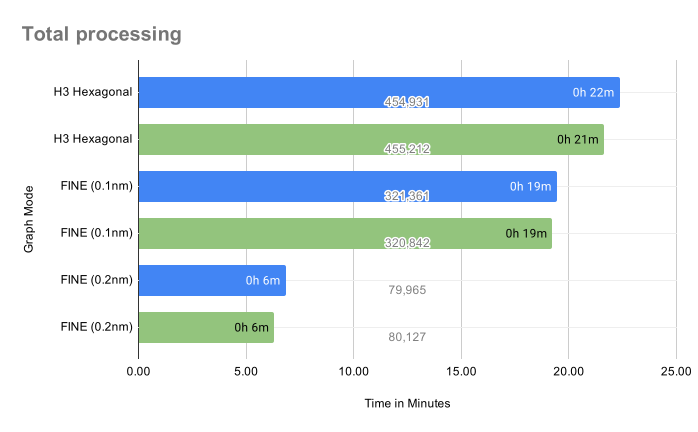
Quick Reference Guide
| Backend | Graph Mode | Total Time | Nodes | Best For |
|---|---|---|---|---|
| PostGIS | FINE 0.2nm | 7.3 min | 46K | ⚡ Fastest - prototyping |
| PostGIS | FINE 0.1nm | 21.3 min | 184K | ⭐ RECOMMENDED - production |
| PostGIS | H3 Hexagonal | 106.6 min | 894K | 🔬 Research - max detail |
| GeoPackage | FINE 0.2nm | 14.4 min | 43K | 📦 Portable - offline use |
| GeoPackage | FINE 0.1nm | 52.0 min | 173K | 📦 Portable - detailed |
| GeoPackage | H3 Hexagonal | 180.0 min | 768K | 📦 Portable - research |
Performance Highlights:
- 🚀 PostGIS is 2.0-2.4× faster than GeoPackage
- ⚠️ Weighting step accounts for 37-89% of total time
- 📈 Graphs scale superlinearly: 4× nodes → 3.6× time
📊 View Detailed Step Timings
### Performance Breakdown by Pipeline Step | Backend | Mode | Step 1: Base | Step 2: Fine/H3 | Step 3: Weighting | Step 4: Pathfinding | |---------|------|--------------|-----------------|-------------------|---------------------| | PostGIS | FINE 0.2nm | 202s (3.4min) | 28s (0.5min) | 161s (2.7min) | 48s (0.8min) | | PostGIS | FINE 0.1nm | 193s (3.2min) | 101s (1.7min) | 762s (12.7min) | 221s (3.7min) | | PostGIS | H3 Hex | 194s (3.2min) | 468s (7.8min) | 4,916s (81.9min) | 815s (13.6min) | | GeoPackage | FINE 0.2nm | 98s (1.6min) | 12s (0.2min) | 684s (11.4min) | 70s (1.2min) | | GeoPackage | FINE 0.1nm | 99s (1.6min) | 36s (0.6min) | 2,703s (45.1min) | 279s (4.7min) | | GeoPackage | H3 Hex | 96s (1.6min) | 276s (4.6min) | 9,586s (159.8min) | 842s (14.0min) | ### Bottleneck Analysis **Weighting Step % of Total Time:** - PostGIS FINE 0.2nm: **36.7%** - PostGIS FINE 0.1nm: **59.7%** - PostGIS H3 Hex: **76.9%** - GeoPackage FINE 0.2nm: **79.1%** - GeoPackage FINE 0.1nm: **86.7%** - GeoPackage H3 Hex: **88.8%** **Key Insight:** Weighting becomes increasingly dominant as graph size grows. PostGIS handles this 2-4× more efficiently through database-side spatial operations.Note on Performance Variance: Benchmark times represent optimal conditions with dedicated system resources. Observed variance: ±20-35% when running concurrent workflows or with background processes. For production planning, use upper bound estimates.
Optimization Tips:
- 💡 Use
--skip-base --skip-fineto resume from weighting step (saves 5-10 min) - ⚡ For iteration: FINE 0.2nm mode offers best speed/detail balance
- 🚀 For production: PostGIS + FINE 0.1nm recommended (21.3 min, detailed routes)